A slow WordPress website can affect more than visitor convenience. Customers may abandon pages before reading about a service, leave an online store while browsing products, or give up on a form when each interaction takes too long. Slow administration can also make everyday website management frustrating for employees.
Speeding up a slow WordPress website usually requires identifying what is causing the delay rather than installing several optimization plugins and hoping for an improvement. Hosting, themes, plugins, images, JavaScript, database queries, caching, external services, and custom code can all affect performance.
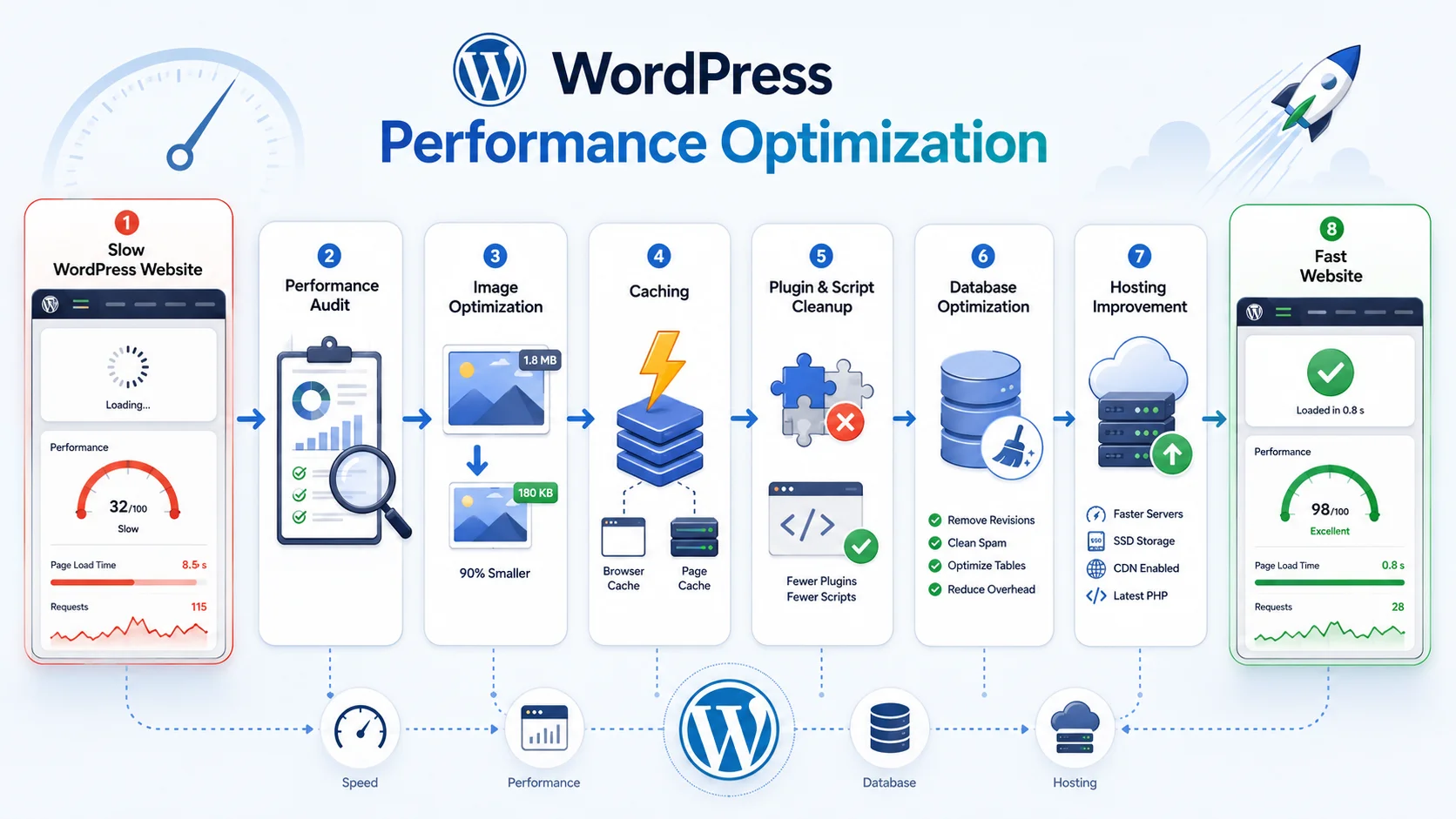
The best approach is to measure the website first, identify the largest bottlenecks, make targeted improvements, and test again. This creates a more reliable result than applying every available optimization technique without understanding the underlying problem.
Before changing the website, determine where it is actually slow. The homepage is only one part of the user experience. Service pages, landing pages, blog posts, search, product categories, product pages, cart, checkout, and logged-in areas can behave very differently.
Businesses should test several representative pages and consider both frontend and backend performance. A page may appear slowly because the server takes too long to generate it, because the browser downloads too many large resources, or because third-party JavaScript delays important content.
The WordPress Site Health area can also reveal useful technical information, including caching-related recommendations and other configuration issues. For more advanced troubleshooting, developers can profile database queries, API requests, PHP execution, plugins, and custom functionality to identify where processing time is being spent.
A good audit creates a baseline. Without knowing the current performance, it becomes difficult to determine whether a new caching configuration, hosting change, or plugin removal actually improved the website.
Optimize Images and Frontend Assets
Images are often among the largest resources on a business website. High-resolution photographs may be uploaded directly from cameras or design tools even though the website displays them at much smaller dimensions.
Images should be resized appropriately and compressed while maintaining acceptable visual quality. Modern image formats can also reduce file size when they are suitable for the website and supported by the chosen workflow.
Responsive image handling helps browsers download an image size appropriate for the visitor’s device rather than forcing every smartphone to download the same large image intended for a desktop screen.
Lazy loading can reduce unnecessary initial downloads for images and other content that appears farther down the page. However, content immediately visible when the page loads should be handled carefully so important visual elements are not unnecessarily delayed.
CSS and JavaScript deserve similar attention. A WordPress website can gradually collect scripts from themes, page builders, analytics systems, advertising platforms, chat tools, popups, sliders, social widgets, and plugins. Each additional resource can introduce more network requests and browser processing.
Developers should determine which assets are actually required on each page. A plugin used only on the contact page does not necessarily need to load its scripts throughout the entire website.
Use Caching to Reduce Repeated WordPress Processing
Without appropriate caching, WordPress may need to process PHP, query the database, load plugin functionality, and build a page repeatedly even when the resulting content is nearly identical for many visitors.
Page caching can store a generated version of a page and serve it without repeating all of that work for every request. This can significantly reduce server processing for pages that do not need to be generated uniquely for each visitor.
Browser caching can also allow visitors to reuse static resources such as images, stylesheets, and scripts instead of downloading unchanged files every time they visit another page.
Persistent object caching can be useful for database-heavy websites by allowing frequently requested data to be retrieved from a faster caching layer rather than repeatedly executing the same database operations.
However, caching needs to reflect the type of website. A company service page can often be cached aggressively, while WooCommerce cart, checkout, account pages, personalized dashboards, and other dynamic areas require more careful rules.
Review Plugins Before Adding More Optimization Plugins
Plugins are one of WordPress’s biggest advantages, but they can also become a source of performance problems when a website accumulates too many extensions or poorly optimized functionality.
The total number of plugins alone does not determine performance. A small number of inefficient plugins can cause more problems than a larger group of lightweight, well-developed ones. What matters is what each plugin does and how often it performs database queries, external requests, background tasks, or frontend processing.
- Remove plugins that are no longer used
- Look for multiple plugins providing overlapping functionality
- Review plugins that load scripts across every page
- Investigate slow database queries and external API requests
- Replace abandoned or inefficient plugins when appropriate
- Avoid installing several optimization plugins that perform the same tasks
- Keep important functionality separated from unnecessary theme features
Complex plugins may still be completely justified when they provide important business functionality. The objective is not to create the smallest possible plugin count but to remove unnecessary processing and avoid duplicated functionality.
Custom development can sometimes provide a cleaner solution when a business uses several plugins and workarounds to achieve one relatively specific workflow.
Speed Up Your WordPress Website
Check the WordPress Database and Backend Workload
As a WordPress website grows, the database can accumulate content revisions, plugin settings, metadata, scheduled tasks, WooCommerce information, transient data, and records from software that may no longer be active.
A large database is not automatically a slow database. Problems occur when WordPress repeatedly performs expensive or poorly structured queries, loads unnecessary data during every request, or depends on inefficient custom code.
Developers can investigate slow queries and review the amount of automatically loaded option data. Unnecessary autoloaded settings can increase the amount of information WordPress loads into memory across many requests.
Database cleanup should be performed carefully. Randomly deleting tables, options, revisions, or metadata can damage plugins or remove information that the business still needs. Always maintain a reliable backup before performing significant database optimization.
WP-Cron activity also deserves attention on websites with many scheduled processes. Backups, email queues, product synchronization, recurring subscriptions, scheduled publishing, imports, and other plugins may all create recurring background work. A large amount of poorly scheduled activity can increase server load.
Hosting Can Become a Bottleneck as the Website Grows
A WordPress website can only perform within the resources and configuration available from its hosting environment. A small shared-hosting plan may work adequately for a simple business website but become limiting when traffic, WooCommerce orders, logged-in users, database activity, or background processing increases.
Server processing capacity, memory, storage performance, database configuration, PHP configuration, caching capabilities, and network infrastructure can all influence website speed.
Before upgrading hosting, businesses should still investigate the application itself. Moving inefficient code to a more powerful server may improve performance temporarily without correcting the underlying problem.
However, if the website has been properly optimized and consistently reaches infrastructure limits, moving to an environment better suited to current traffic and workload can provide a meaningful improvement.
A content delivery network can also help distribute static assets closer to visitors in different geographic locations. This can be particularly useful when a website serves customers across several countries.
Pay Attention to Third-Party Services
Not every slowdown originates inside WordPress. Websites frequently depend on external services for analytics, advertising, chat, fonts, videos, maps, reviews, marketing automation, payment functionality, social media, and other features.
These services can add scripts and network requests that WordPress itself cannot fully control. If a third-party resource responds slowly, part of the page may also appear or become interactive later than expected.
Businesses should periodically review whether every third-party service is still providing enough value to justify its performance cost. Old marketing tags and abandoned tracking systems are particularly easy to forget because they may continue loading long after the related campaign has ended.
Server-side API integrations can cause similar problems when they are executed during normal page loads. When external information does not need to be retrieved in real time, caching the result or processing synchronization through background jobs can help keep visitor requests faster.
WooCommerce websites are more dynamic than many standard WordPress sites. Product filtering, inventory, carts, sessions, customer accounts, checkout, payments, orders, and personalized content can require database and server processing that cannot always be handled through simple full-page caching.
A growing WooCommerce store should monitor product queries, variations, search and filtering, database size, background tasks, checkout performance, and integrations with payment, shipping, inventory, or ERP systems.
Product images should be optimized carefully because catalog and product pages may display many images at once. Stores should also avoid loading unnecessary marketing and plugin scripts throughout the complete customer journey.
Performance testing should include actual shopping flows—not only a cached homepage. A fast homepage provides little value if customers experience delays while filtering products or completing checkout.
Performance testing tools are useful for identifying problems, but achieving a perfect score should not become more important than creating a fast and reliable experience for real visitors.
Some websites need functionality that introduces legitimate performance costs. E-commerce tracking, customer support, analytics, video, interactive interfaces, and other tools may provide real business value.
The better objective is to understand the tradeoff. Remove unnecessary costs, optimize the functionality the website genuinely needs, and focus on important user journeys.
Changes should also be tested after implementation. Minifying or delaying scripts aggressively can occasionally break menus, forms, sliders, checkout functionality, or third-party integrations. Performance improvements should never come at the cost of core website functionality.
Keep WordPress Fast as the Website Changes
Performance optimization is not a one-time project. New pages, plugins, marketing scripts, images, integrations, and custom features can gradually change how the website behaves.
Regular maintenance should include performance checks so new bottlenecks can be identified before the website becomes noticeably slow. Large design changes, plugin installations, WooCommerce updates, and new integrations are good reasons to test again.
Encoder IT Limited provides WordPress performance optimization, custom theme and plugin development, WooCommerce optimization, database troubleshooting, API integration, hosting consultation, and ongoing WordPress maintenance for business websites.
A faster WordPress website usually comes from improving several connected areas rather than relying on one optimization setting. By measuring performance first, reducing unnecessary frontend resources, using caching appropriately, reviewing plugins and database activity, improving hosting where necessary, and continuing to monitor the website after launch, businesses can create a faster and more dependable experience for their visitors.