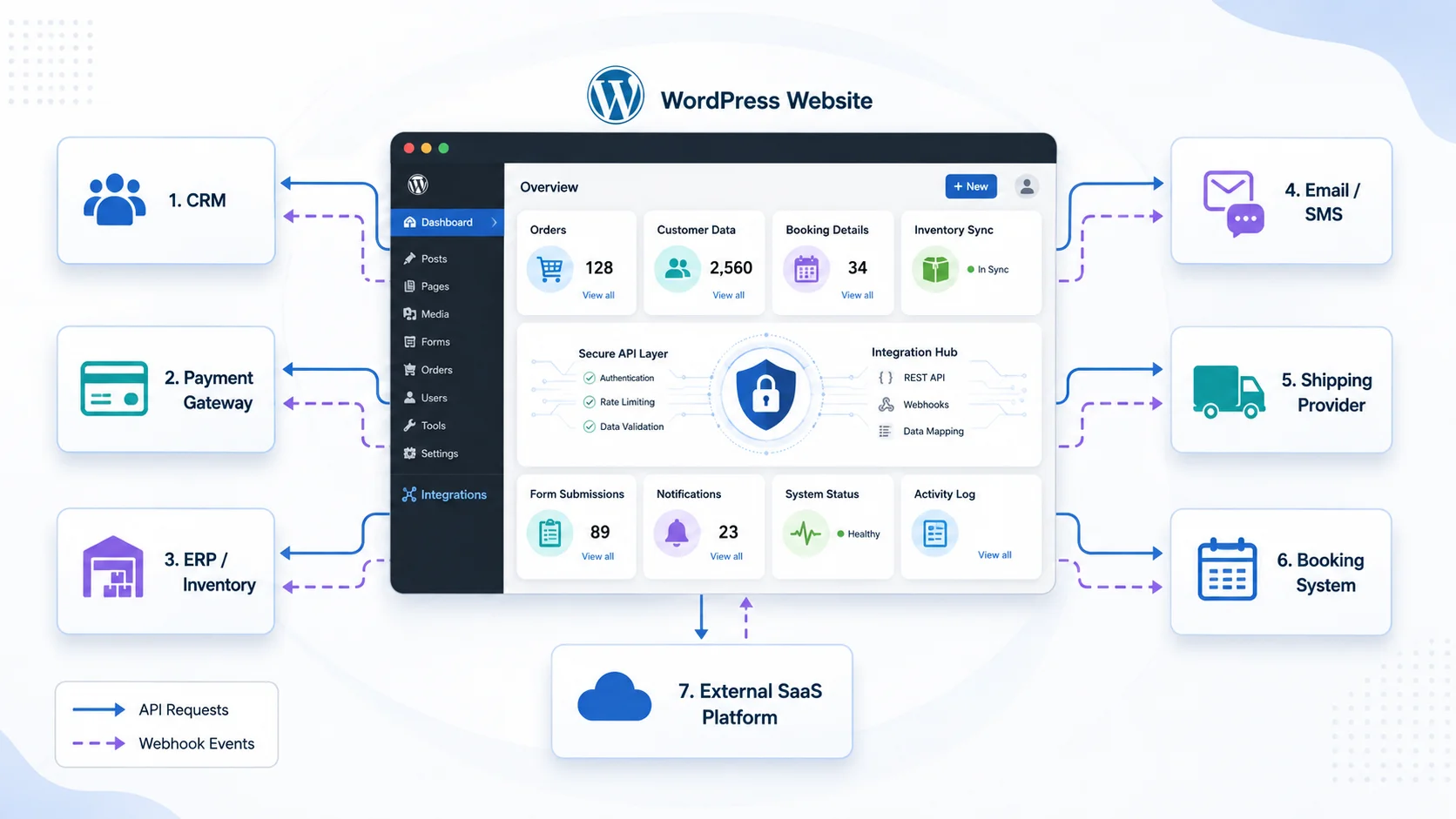
Modern WordPress websites often need to communicate with software outside WordPress. A business may need to send leads to a CRM, process payments through a payment provider, display information from another platform, synchronize products, connect a booking system, send SMS notifications, or automate internal workflows.
Third-party API integration with WordPress allows these systems to exchange information automatically. Instead of employees copying data manually between different platforms, WordPress can send requests, receive responses, process events, and update website data as part of a connected workflow.
A reliable integration requires more than simply calling an API URL. Authentication, error handling, security, data validation, caching, webhooks, logging, and performance all need to be considered, particularly when the integration affects payments, customer information, orders, or other important business processes.
Understand What the API Needs to Do
Before writing code, define exactly what information needs to move between WordPress and the external platform. Some integrations only retrieve information, while others send data or synchronize information in both directions.
For example, a WordPress website might retrieve product availability from an external inventory platform. A contact form might send new leads to a CRM. WooCommerce could send order information to a fulfillment provider, while the provider sends shipment updates back to WordPress.
The third-party API documentation should explain available endpoints, request methods, authentication requirements, required parameters, response formats, rate limits, and possible errors. Understanding these requirements first helps avoid unnecessary development later.
Use the WordPress HTTP API for External Requests
WordPress provides its own HTTP API for communicating with external services. Developers can use functions such as wp_remote_get() to retrieve data, wp_remote_post() to send POST requests, and wp_remote_request() when another HTTP method or more customized request behavior is required.
Using WordPress’s built-in HTTP functions is generally preferable to creating separate low-level request logic because they integrate with the WordPress environment and provide consistent response and error handling.
A typical integration may need to send authentication headers, specify the expected content type, encode request data as JSON, and then inspect the response status before processing the returned information.
Developers should also account for network failures and invalid responses. An external API can become temporarily unavailable, return an error, or respond with unexpected data. WordPress should not assume every request succeeds simply because it was sent.
Keep API Credentials and Sensitive Logic Secure
Many third-party services require API keys, access tokens, client secrets, or other credentials. These credentials should never be exposed unnecessarily in frontend JavaScript or public HTML where website visitors can inspect them.
Requests involving private credentials should normally be handled through trusted server-side WordPress code. Depending on the project, credentials may be stored using secure configuration practices rather than being hardcoded throughout theme files.
Permission checks are equally important when WordPress users can trigger an integration. If only administrators should synchronize customer records or modify an external account, the backend needs to verify that permission rather than simply hiding the button from other users.
WordPress nonces can help protect authenticated forms, AJAX actions, and REST requests against certain types of request misuse. However, a nonce does not replace authorization. The application should still verify whether the current user has permission to perform the requested operation.
- Keep private API credentials on trusted server-side code
- Validate and sanitize data before sending it
- Validate important information returned by external services
- Check WordPress user permissions for protected actions
- Use nonces where appropriate for authenticated requests
- Handle API failures instead of assuming every request succeeds
- Record useful integration errors without exposing sensitive credentials
Use Webhooks When WordPress Needs External Updates
Not every integration should require WordPress to continuously ask an external platform whether something has changed. When supported by the provider, webhooks can allow the external service to notify WordPress after an important event occurs.
A payment provider might send a webhook after a payment succeeds or is refunded. A shipping service could notify the website when a parcel status changes. A CRM might send an event after a customer record is updated.
WordPress can expose a custom REST API endpoint to receive these events. The endpoint can validate the incoming request, process the payload, and then update the appropriate WordPress post, user, WooCommerce order, custom table, or other record.
Webhook security deserves special attention. Providers commonly offer signatures, secrets, or another verification mechanism that should be checked before trusting the event. The integration should also be prepared for duplicate events because some providers may retry delivery when they do not receive the expected response.
For important workflows, processing should be designed to be idempotent where practical. Receiving the same payment event twice, for example, should not create two payments or repeat another action that was intended to happen only once.
Integrate Your WordPress Website With Third-Party APIs
Cache External Data When Real-Time Requests Are Not Necessary
Calling an external API every time a visitor opens a page can create unnecessary delays and increase dependency on another service. It may also consume API usage limits more quickly.
If the information does not need to change every second, WordPress can temporarily cache API results and reuse them for a defined period. The WordPress Transients API is one option for storing temporary data that can expire automatically.
For example, exchange rates, external product information, event listings, or other relatively stable data might be cached for several minutes or hours depending on the business requirement. The next visitor can then receive the cached information without waiting for another external request.
Real-time information should be treated differently. Payment confirmation, critical inventory updates, authentication, or other transactional operations may need direct verification rather than relying on previously cached data.
Keep Complex Integrations Outside the Theme
A small presentation-related integration may occasionally belong close to theme functionality, but important business integrations are usually easier to maintain when placed in a custom plugin or another structured application layer.
If payment processing, CRM synchronization, order automation, or another business workflow is placed entirely inside a theme, changing the website design can become unnecessarily connected to critical business functionality.
A custom WordPress plugin can organize API clients, authentication, webhooks, scheduled synchronization, administrative settings, logs, and business logic independently from the website’s visual design.
This also makes future maintenance easier. Developers can update the theme without changing the integration, and the integration can evolve without requiring unnecessary modifications to templates.
Plan for Synchronization Errors and API Downtime
External systems will not always respond successfully. APIs may experience outages, credentials can expire, requests may hit usage limits, or network connections can fail. A professional integration needs a strategy for these situations.
For non-critical synchronization, failed requests may be queued and attempted again later. For important transactions, administrators may need a visible error status and a way to retry the operation manually.
Logging can record useful information such as the integration involved, time of the request, response status, related WordPress record, and error message. Sensitive information such as API secrets, passwords, or complete payment details should not be unnecessarily written into logs.
Scheduled synchronization can also be appropriate when real-time communication is unnecessary. WordPress can periodically retrieve or send information instead of performing expensive synchronization every time a page loads.
Test the Complete Integration, Not Only a Successful API Call
A developer may confirm that the API returns a successful response and assume the integration is complete. Real business workflows require more testing.
Test invalid credentials, missing information, unavailable APIs, timeouts, duplicate webhook events, unexpected response formats, and permission failures. If the integration processes payments or orders, test failed payments, cancellations, refunds, and other relevant transaction states as well.
It is also important to confirm what happens when only part of a multi-step process succeeds. If WordPress creates an order but the fulfillment API fails, the system should clearly identify that the fulfillment step still requires attention rather than reporting the entire workflow as complete.
Testing these situations before launch helps prevent integrations from silently creating incorrect or incomplete business data.
Build API Integrations Around Real Business Workflows
Third-party integration is most valuable when it removes repeated work or creates functionality that would otherwise require employees to use several disconnected systems. Businesses should begin by identifying where information currently needs to be copied manually and which processes would benefit most from automation.
Encoder IT Limited develops custom WordPress API integrations for CRM platforms, payment gateways, WooCommerce, inventory systems, shipping providers, booking platforms, SaaS applications, AI services, and other third-party software. Our work can include custom plugins, REST APIs, webhooks, data synchronization, workflow automation, and integration maintenance.
A well-designed WordPress API integration turns the website into part of a larger business ecosystem. By using secure server-side requests, reliable authentication, webhooks, caching, structured error handling, and maintainable custom development, WordPress can exchange information with external systems while reducing manual work and supporting more connected business processes.