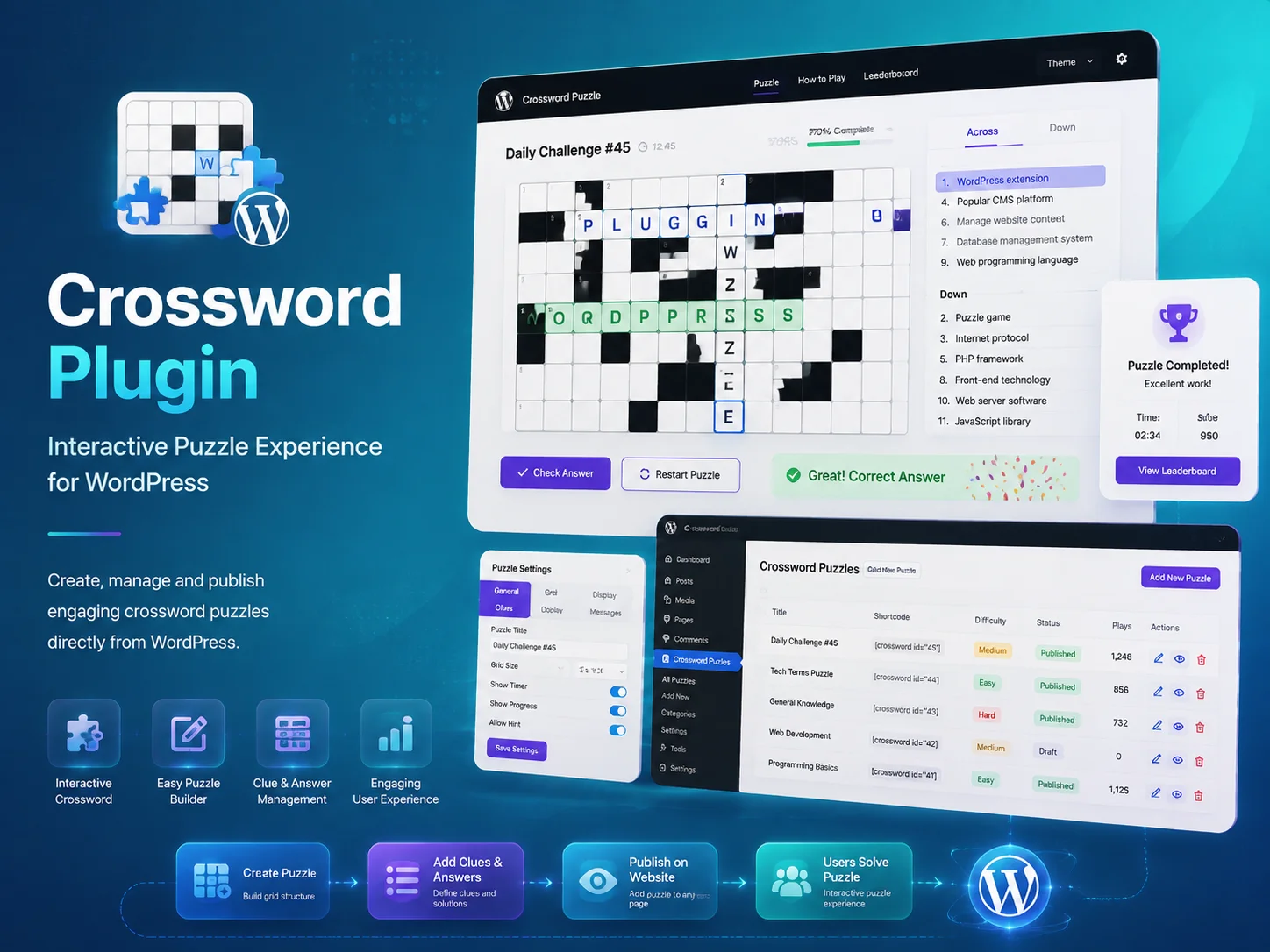
The Encoder IT team designed and developed a custom Crossword WordPress Plugin that allows website owners to create, manage, and publish interactive crossword puzzles directly from the WordPress dashboard.
🚀 About the Project
This custom plugin was developed to provide visitors with an engaging and interactive puzzle experience inside a WordPress website. Users can read clues, enter answers, check their progress, and complete crossword puzzles without leaving the page.
The solution was built according to the client’s requirements, with an easy management interface for administrators and a responsive puzzle layout for users across desktop, tablet, and mobile devices.
🧩 Key Plugin Features
Custom WordPress plugin developed from scratch
Interactive crossword puzzle interface
Across and down clue management
Custom crossword grid creation
Answer input and validation
Correct and incorrect answer feedback
Puzzle completion tracking
Reset and restart functionality
Responsive design for desktop, tablet, and mobile devices
Simple puzzle management from the WordPress dashboard
⚙️ Crossword Management
Create and manage multiple crossword puzzles
Add custom clues and answers
Configure across and down puzzle entries
Control puzzle titles and descriptions
Update existing puzzles from the admin panel
Publish puzzles on selected WordPress pages or posts
Organize puzzle content without editing theme files
🎮 User Experience
Clean and easy-to-understand crossword layout
Clickable puzzle cells
Clear highlighting of selected words and clues
Easy navigation between answer fields
Instant answer-checking functionality
Smooth gameplay across different screen sizes
Engaging experience for education, entertainment, and quizzes
The completed plugin provides the client with a flexible and engaging way to publish interactive crossword puzzles through WordPress. Administrators can create and manage puzzle content easily, while visitors receive a smooth and responsive gameplay experience.
The final result is a scalable custom WordPress solution suitable for educational websites, news platforms, entertainment portals, membership sites, and online learning systems.
🎥 Project Demonstration
Watch the video below to see how the custom Crossword WordPress Plugin works.
Need a Custom Interactive WordPress Plugin?
Looking for a crossword, quiz, educational game, or interactive WordPress plugin? Contact the Encoder IT team for tailored WordPress plugin development services.
The Encoder IT team designed and developed a custom Multi-Step Booking WordPress Plugin integrated with the Google Calendar API and Twilio SMS API. The solution allows customers to complete bookings through a structured step-by-step process while automatically synchronizing appointments and sending SMS notifications.
🚀 About the Project
This custom WordPress plugin was created to simplify appointment scheduling for both customers and administrators. Instead of using a long and complicated booking form, users complete the process through multiple clear steps, including service selection, date and time selection, personal information, and booking confirmation.
The plugin connects with Google Calendar to manage appointment availability and uses Twilio to send automated SMS confirmations and booking updates.
📅 Key Booking Features
Custom WordPress booking plugin developed from scratch
Multi-step appointment booking workflow
Service selection and booking detail collection
Available date and time-slot selection
Customer information collection and validation
Booking summary before final confirmation
Automatic booking confirmation
Responsive interface for desktop, tablet, and mobile devices
Custom workflow based on the client’s business requirements
📆 Google Calendar API Integration
Automatic appointment synchronization with Google Calendar
Real-time availability based on existing calendar events
Prevention of duplicate and conflicting bookings
Automatic calendar event creation after confirmation
Booking date, time, service, and customer detail synchronization
Centralized appointment management through Google Calendar
📱 Twilio SMS API Integration
Automated SMS confirmation after successful booking
Booking reminder notifications
Appointment date and time details sent directly to customers
SMS alerts for booking updates or cancellations
Customizable notification messages
Secure communication with the Twilio API
⚙️ Booking Workflow
Customer selects the required service
User chooses an available date and time
Customer enters personal and contact information
The system validates the submitted details
Calendar availability is checked in real time
The appointment is created in Google Calendar
A confirmation SMS is sent through Twilio
Administrators can review and manage the booking
💡 User & Administrator Experience
Simple and easy-to-follow multi-step booking process
Clear progress through each booking stage
Reduced risk of incomplete booking submissions
Automatic calendar and notification management
Reduced manual appointment coordination
Improved communication between customers and administrators
Centralized booking management within WordPress
💻 WordPress Plugin Development
Custom PHP and WordPress development
Google Calendar API integration
Twilio SMS API integration
Secure form validation and data sanitization
Custom database and booking record management
API error handling and response validation
Scalable structure for future payment or email integrations
✅ Project Outcome
The completed plugin provides the client with a reliable and automated appointment-booking solution. Customers can complete bookings through a simple multi-step process, while appointments are synchronized with Google Calendar and SMS confirmations are sent automatically through Twilio.
The final result is a scalable custom WordPress booking system that improves customer convenience, reduces administrative work, prevents scheduling conflicts, and strengthens appointment communication.
🎥 Project Demonstration
Watch the video below to see how the multi-step booking plugin works with Google Calendar and Twilio SMS integration.
Need a Custom WordPress Booking Plugin?
Looking for a custom appointment system, Google Calendar integration, Twilio SMS automation, or advanced WordPress booking workflow? Contact the Encoder IT team for tailored WordPress plugin development and API integration services.
The Encoder IT team designed and developed a custom Meeting Schedule WordPress Plugin to help businesses organize meeting availability, collect participant information, and manage scheduled appointments directly from a WordPress website.
🚀 About the Project
This custom WordPress plugin was created to simplify the process of arranging meetings between businesses and their customers, clients, or team members. Users can review available meeting slots, select a suitable date and time, provide their information, and submit a meeting request through a clear and structured workflow.
The plugin also provides administrators with a centralized way to review, confirm, update, and manage meeting schedules from the WordPress dashboard.
📅 Key Plugin Features
Custom WordPress meeting schedule plugin developed from scratch
Available date and time-slot selection
Meeting request and appointment submission
Customer or participant information collection
Meeting purpose and additional note fields
Booking confirmation workflow
Meeting status management
Responsive interface for desktop, tablet, and mobile devices
Customizable scheduling flow based on business requirements
🗓️ Meeting Scheduling Workflow
User selects an available meeting date
Available time slots are displayed
Participant enters personal and contact information
User adds the meeting purpose or message
The system validates the submitted details
A meeting request is created
Administrators review and manage the schedule
The meeting status can be updated when required
⚙️ Administrator Features
Centralized meeting-management dashboard
Create and manage available meeting slots
Review participant and meeting details
Confirm, reschedule, cancel, or complete meetings
Search and filter scheduled meetings
Manage meeting availability from WordPress
Reduce manual scheduling and coordination work
💻 WordPress Plugin Development
Custom PHP and WordPress development
Custom database and meeting-record management
Secure form validation and data sanitization
Custom WordPress administration pages
Responsive frontend scheduling interface
Scalable structure for future calendar, email, or SMS integrations
Flexible settings for different meeting workflows
💡 User Experience
Simple and easy-to-follow meeting request process
Clear presentation of available dates and times
Mobile-friendly scheduling experience
Reduced back-and-forth communication
Fast access to meeting details and availability
Smooth experience across different screen sizes
✅ Project Outcome
The completed plugin provides the client with an organized and reliable solution for managing meeting requests through WordPress. Users can choose suitable meeting slots and submit their details, while administrators can control availability and manage all scheduled meetings from one centralized dashboard.
The final result is a scalable custom WordPress scheduling solution that improves customer convenience, reduces manual coordination, and creates a more efficient meeting-management workflow.
🎥 Project Demonstration
Watch the video below to see how the custom Meeting Schedule WordPress Plugin works.
Need a Custom WordPress Scheduling Plugin?
Looking for a meeting scheduler, appointment-booking system, calendar integration, or custom WordPress workflow? Contact the Encoder IT team for tailored WordPress plugin development services.
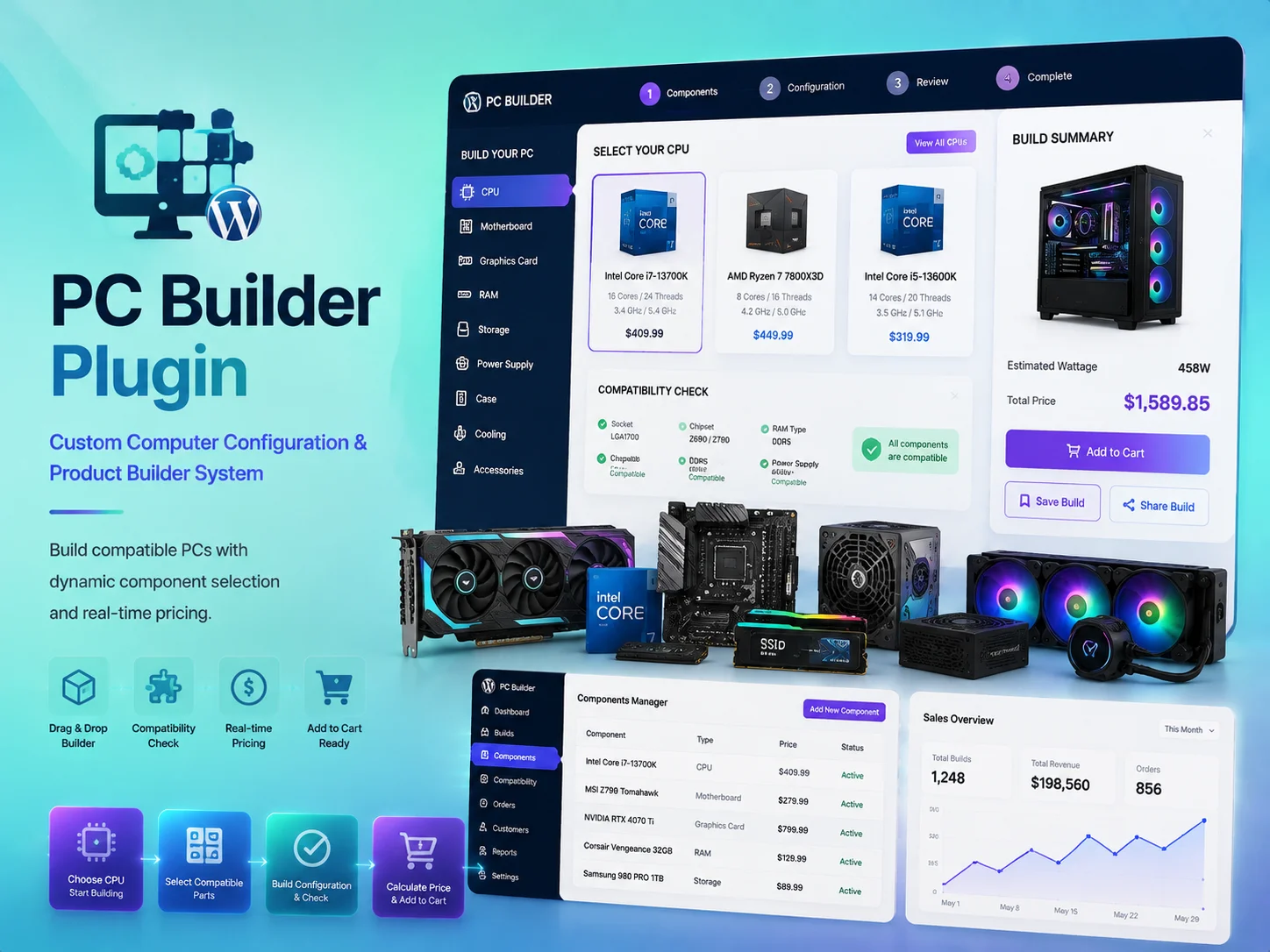
The Encoder IT team designed and developed a custom PC Builder WordPress Plugin that allows customers to select compatible computer components and create a personalized PC configuration directly from a WordPress website.
🚀 About the Project
This custom WordPress plugin was created to simplify the process of building a desktop computer online. Users can choose individual components step by step, review their selected configuration, and calculate the complete build cost before placing an order or submitting an enquiry.
The plugin provides a guided and user-friendly experience while helping administrators manage PC parts, categories, pricing, compatibility rules, and available stock from the WordPress dashboard.
🖥️ Key Plugin Features
Custom WordPress PC builder plugin developed from scratch
Step-by-step computer component selection
Dynamic PC configuration summary
Automatic total price calculation
Product and component compatibility management
Component availability and stock display
Custom product categories for PC parts
Build submission or purchase workflow
Responsive interface for desktop, tablet, and mobile devices
Customizable workflow based on business requirements
🔧 Supported PC Components
Processors and CPUs
Motherboards
Graphics cards and GPUs
Memory and RAM
Solid-state drives and hard drives
Power supply units
Computer cases
CPU coolers and cooling systems
Monitors and display accessories
Keyboards, mice, and additional peripherals
⚙️ PC Building Workflow
User selects the required processor
The system displays suitable motherboard options
Customer selects memory, storage, graphics, and power components
Compatible cases and cooling options are presented
The plugin updates the configuration and price automatically
User reviews the complete PC build summary
The finished configuration can be submitted or purchased
Administrators receive and manage the build details
🔄 Compatibility & Pricing
Helps prevent incompatible component combinations
Filters available parts based on previous selections
Updates the total build price in real time
Displays product availability and stock information
Supports different component variations and pricing options
Provides customers with a clear cost breakdown
💻 WordPress Plugin Development
Custom PHP and WordPress development
WooCommerce integration where required
Custom database fields and component relationships
Dynamic frontend interactions using JavaScript
Secure form validation and data sanitization
Custom WordPress administration pages
Scalable architecture for future product and feature expansion
💡 User & Administrator Experience
Simple and guided PC-building process
Clear presentation of selected components
Real-time pricing and configuration updates
Reduced risk of selecting incompatible products
Easy component and pricing management for administrators
Centralized control through the WordPress dashboard
Smooth experience across different screen sizes
✅ Project Outcome
The completed plugin provides customers with an interactive and convenient way to create customized PC configurations directly from a WordPress website. It improves product discovery, provides clearer pricing, and helps users select suitable components through a structured workflow.
The final result is a scalable custom WordPress solution that combines PC configuration, component compatibility, dynamic pricing, product management, and a streamlined purchasing experience.
🎥 Project Demonstration
Watch the video below to see how the custom PC Builder WordPress Plugin works.
Need a Custom WordPress Product Builder?
Looking for a PC configurator, product builder, compatibility system, or custom WooCommerce plugin? Contact the Encoder IT team for tailored WordPress plugin development services.
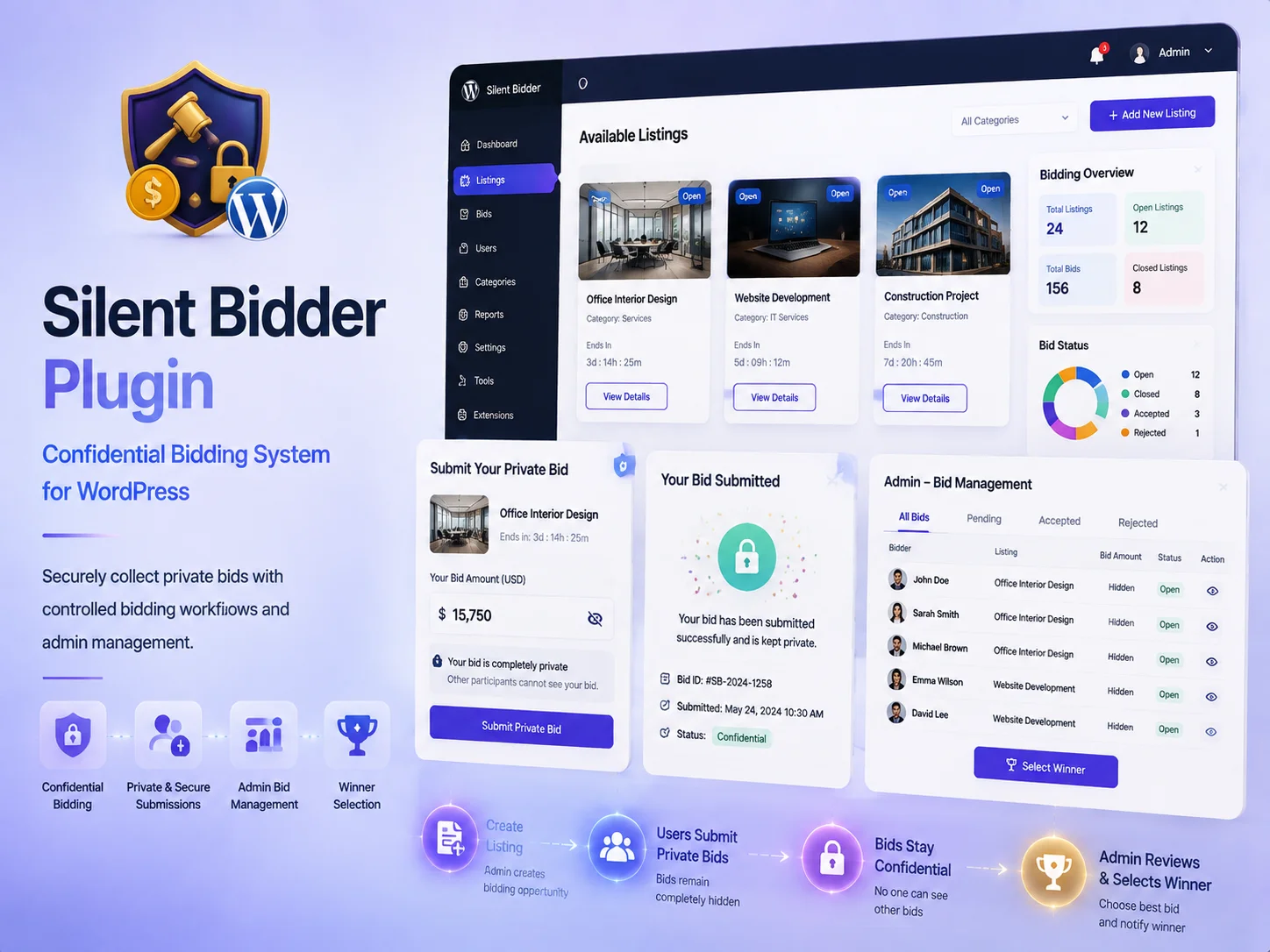
The Encoder IT team designed and developed a custom Silent Bidder WordPress Plugin that allows users to place confidential bids on listed items, products, services, or opportunities directly through a WordPress website.
🚀 About the Project
This custom WordPress plugin was created to support a silent bidding process where users can submit private offers without seeing the bids placed by other participants.
The system provides a secure and organized workflow for collecting bids while giving administrators complete control over listings, bidding periods, participant information, submitted amounts, and final bid selection.
💰 Key Plugin Features
Custom WordPress silent bidding plugin developed from scratch
Private and confidential bid submission
Custom item, product, or opportunity listings
Bid opening and closing date configuration
Customer information collection
Bid amount validation
Automatic bidding-status updates
Bid history and submission records
Responsive interface for desktop, tablet, and mobile devices
Customizable workflow based on business requirements
🔒 Silent Bidding Process
Users browse available bidding opportunities
Participants review the listing details and requirements
Each user submits a confidential bid amount
Submitted bids remain hidden from other participants
The system validates the bid before submission
Administrators review all bids after the bidding period
The preferred or highest bid can be selected
Bid status can be updated from the WordPress dashboard
⚙️ Administrator Features
Create and manage silent bidding listings
Set bidding start and closing dates
Configure minimum bid requirements
Review bidder details and submitted amounts
Search and filter bid records
Manage open, closed, accepted, and rejected bids
Select the winning or preferred bidder
Maintain a complete record of bidding activity
🛡️ Security & Validation
Confidential bid storage and presentation
Secure user-input validation and sanitization
Protection against unauthorized bid access
Controlled bidding periods and submission deadlines
Prevention of incomplete or invalid bid submissions
Role-based access to administrative bidding information
💻 WordPress Plugin Development
Custom PHP and WordPress development
Custom database and bid-record management
Custom post types and metadata where required
Secure frontend bidding forms
Custom WordPress administration pages
Responsive and performance-focused interface
Scalable architecture for future payment or notification integrations
💡 User & Administrator Experience
Simple and easy-to-follow bidding process
Clear presentation of listing information
Private bidding experience for participants
Centralized bid management for administrators
Reduced manual bid collection and comparison
Improved transparency and organization
Smooth experience across different screen sizes
✅ Project Outcome
The completed plugin provides the client with a reliable and secure way to manage silent bidding through WordPress. Users can submit confidential offers, while administrators can review, compare, and manage all bids through one centralized dashboard.
The final result is a scalable custom WordPress solution that improves bidding privacy, simplifies administration, and creates an organized process for collecting and evaluating offers.
🎥 Project Demonstration
Watch the video below to see how the custom Silent Bidder WordPress Plugin works.
Need a Custom WordPress Bidding Plugin?
Looking for a silent bidding system, auction platform, quotation workflow, or custom WordPress marketplace feature? Contact the Encoder IT team for tailored WordPress plugin development services.
The Encoder IT team designed and developed a custom Multi-Step Booking WordPress Plugin that allows users to complete service or appointment bookings through a clear, structured, and user-friendly step-by-step process.
🚀 About the Project
This custom WordPress plugin was created to simplify complex booking forms by dividing the process into multiple manageable steps. Users can select a service, choose an available date and time, enter their personal information, review the booking summary, and confirm the reservation.
The plugin was developed from scratch according to the client’s business workflow, providing customers with a smoother booking experience while helping administrators manage appointments efficiently from the WordPress dashboard.
📅 Key Plugin Features
Custom WordPress booking plugin developed from scratch
Structured multi-step booking process
Service or appointment selection
Available date and time-slot selection
Customer information collection
Form validation at every booking step
Booking summary before final submission
Automatic booking confirmation
Booking status and appointment management
Responsive interface for desktop, tablet, and mobile devices
⚙️ Multi-Step Booking Workflow
Step 1: Customer selects the required service
Step 2: User chooses an available booking date
Step 3: Customer selects a suitable time slot
Step 4: Personal and contact information is entered
Step 5: The complete booking summary is displayed
Step 6: The booking is validated and confirmed
🗓️ Appointment Management
Create and manage available booking schedules
Configure services, dates, and time slots
Review customer and appointment details
Manage pending, confirmed, completed, or cancelled bookings
Prevent incomplete or invalid submissions
Search and filter booking records
Update appointment information from the WordPress dashboard
💻 WordPress Plugin Development
Custom PHP and WordPress development
Custom database and booking-record management
Dynamic frontend interactions using JavaScript
Secure form validation and data sanitization
Custom WordPress administration pages
Responsive and performance-focused frontend development
Scalable structure for future payment, email, calendar, or SMS integrations
💡 User & Administrator Experience
Simple and easy-to-follow booking process
Clear progress through each booking stage
Reduced form complexity and abandonment
Mobile-friendly appointment booking experience
Centralized booking management for administrators
Reduced manual appointment coordination
Smooth experience across different screen sizes
✅ Project Outcome
The completed plugin provides the client with a reliable and organized booking solution inside WordPress. Customers can complete reservations through a clear multi-step workflow, while administrators can manage schedules, customer information, and booking statuses from one centralized dashboard.
The final result is a scalable custom WordPress booking system that improves customer convenience, reduces incomplete submissions, and simplifies appointment administration.
🎥 Project Demonstration
Watch the video below to see how the custom Multi-Step Booking WordPress Plugin works.
Need a Custom WordPress Booking Plugin?
Looking for a multi-step booking form, appointment-management system, service reservation plugin, or custom WordPress workflow? Contact the Encoder IT team for tailored WordPress plugin development services.